
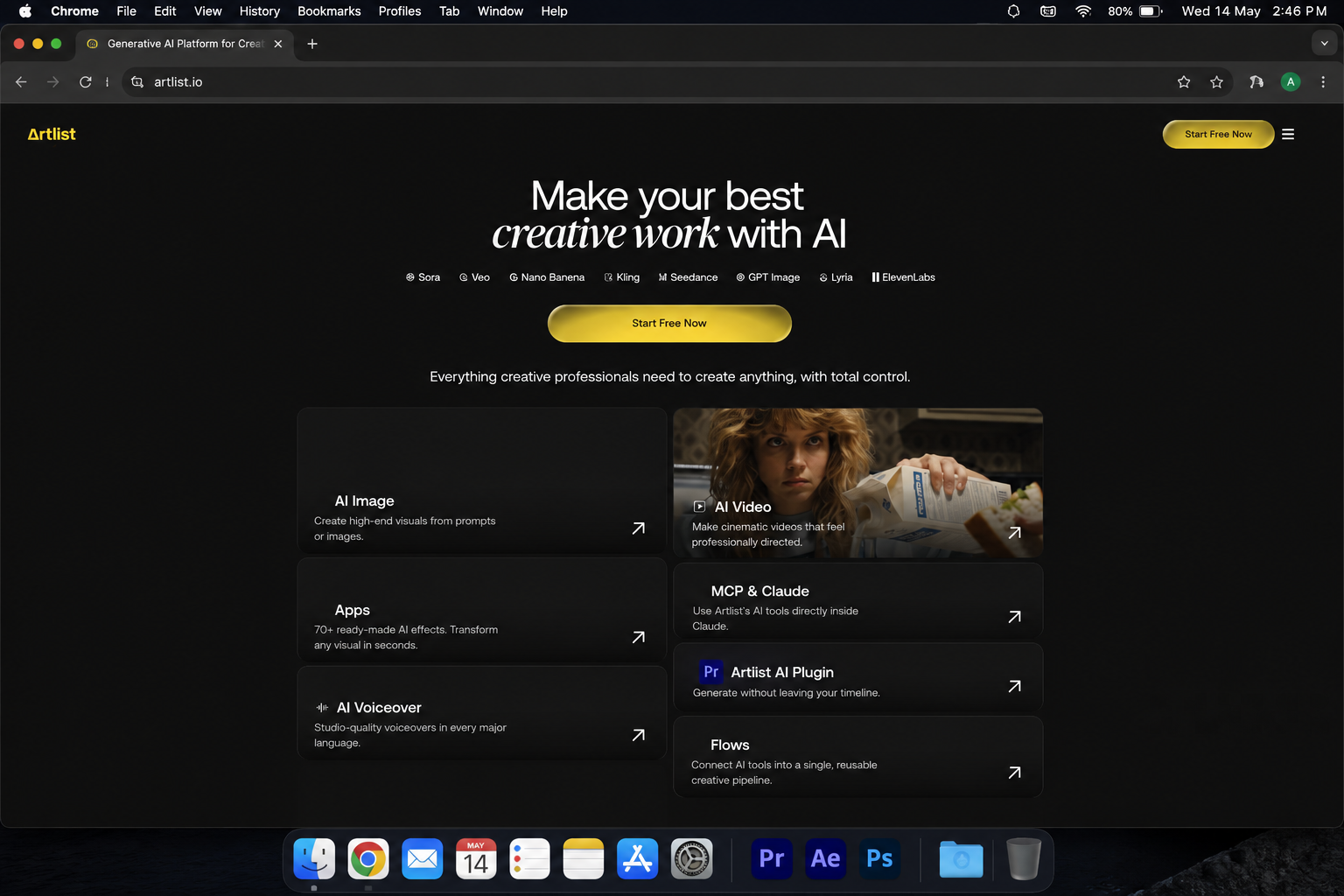
Imagine this: you have a video idea in your head. You need a cinematic shot, a voiceover, background music, and sound effects — all matching the same mood, all licensed for commercial use. Normally that means five different subscriptions, three browser tabs, and an hour wasted on asset hunting before you’ve even started editing.
So, what exactly is an AI artlist?
Artlist started in 2016 as a royalty-free music licensing platform for filmmakers. It was good — really good. Simple licensing, curated quality, and a clean subscription model that made it a go-to for YouTubers and video professionals. But the platform didn’t stop there. Stock footage came in 2021. Sound effects in 2022. Video templates, editing plugins, and AI voiceover by 2024. And in 2025–2026, Artlist AI became something entirely different — a full-stack AI creative ecosystem for video creators.
This isn’t just a music library anymore. Let’s break down exactly what Artlist AI does, how it works, what’s genuinely impressive, and what it still gets wrong.
What Does an AI Artlist Actually Do?
An AI artlist can work in many different ways.
At its core, Artlist AI is a unified creative workspace that brings together AI image generation, AI video generation, AI voiceover, AI music, and a massive royalty-free stock library — all under one subscription, one license, and one browser tab.
The platform’s official description puts it well: “The ultimate AI ecosystem for creators, providing the best AI tools and the highest-quality stock catalog made by leading artlist worldwide.” But what does that actually mean in practice? Let’s walk through how a real project flows through artlist ai from start to finish.
Step 1: Start With an Idea
Every project on Artlist AI starts the same way every great creative project does — with a concept. You know the mood, the message, or the story you want to tell. Maybe it’s a 30-second brand ad, a cinematic travel reel, a YouTube intro, or a product explainer video.
Artlist AI’s interface is built around this creative-first mindset. When you log into the AI Toolkit, you’re not hit with technical menus or overwhelming settings. You’re presented with a clean, session-based workspace where you can experiment freely. There’s even an Explore page inside the Toolkit where you can browse pre-generated examples across categories — a genuinely useful way to get inspired before you start typing prompts yourself.
The idea stage is still entirely human. Artlist AI gives you the tools; what you make with them depends on what you’re trying to say.
Step 2: Write a Prompt or Provide References
Once you know what you want, you communicate it to Artlist AI through a text prompt, a reference image, or an uploaded video clip. This is where prompt quality directly affects output quality.What sets Artlist AI apart here is its auto-prompt enhancement feature. When you enter a basic description, the platform intelligently expands it — adding details about lighting, mood, motion, and style that you may not have thought to include. This is particularly helpful for creators who are great at video storytelling but less experienced with AI prompting.
For the AI Image Generator, you can type a detailed description and choose from multiple leading AI image models — including Nano Banana Pro (known for 4K-quality visuals with sharp typography), Kling 3.0, Flux 2.0, GPT Image 1.5, and Seedream 5.0, among others. Different models produce visually different results, and having them all in one place lets you compare outputs without juggling multiple subscriptions. For video, you can also use Start Frame and End Frame controls on supported models — meaning you upload an image as the opening shot and another as the closing shot, and Artlist AI generates the motion in between. This level of directional control over AI-generated footage is genuinely useful for professional workflows.
Step 3: Generate Multiple Results
Professional creators never accept the first output. They generate multiple variations, evaluate each one critically, and pick what actually serves the project best. Artlist AI makes this fast and organized. Your generations appear in a draggable, resizable session grid — so you can visually compare multiple outputs side by side without losing track of what you generated. You can adjust duration, aspect ratio, and resolution per generation, and model-specific settings update automatically when you switch models.
As of 2026, Artlist AI’s video models include Veo 3.1 (Google’s cinema-quality video generator), Sora 2, the full Kling family (2.5, 2.6, and 2.6 Pro), Seedance 2.0, Hailuo 2.3, and over a dozen others — all accessible under a single plan. This model library is one of the most comprehensive available on any single platform right now, and Artlist consistently integrates new models as they launch.
The important thing here is that generating multiple results isn’t wasted effort — it’s part of the creative process. Artlist AI is designed to make iteration fast so creators spend less time waiting and more time deciding.
Step 4: Curate and Refine
After generating your options, Artlist AI’s workspace lets you refine without rebuilding. This is where the platform’s modular design pays off.
The flagship Artlist Studio (launched in Spring 2026) takes this further. In Studio, you work with reusable characters and consistent locations across multiple scenes. You define a character once — their look, their voice, their mannerisms — and pull that same character into different shots without starting from scratch. According to Artlist’s own guide, the workflow has four core steps: creating characters, creating locations, generating frames, and directing your video.
Think of it this way: most AI video tools work like a slot machine. You spin once, get a result, and if anything changes — the lighting, the character’s expression, the background — you’re spinning again from zero. Artlist Studio changes the equation by separating the components. You tweak one element without blowing up everything else. That’s a real professional workflow, not just a feature.
Step 5: Build the Final Work
This is where Artlist AI’s integrated ecosystem becomes genuinely powerful. After generating your visuals, you stay inside the same workspace to:
- Add an AI voiceover in 71+ languages, with emotional tone controls and voice cloning options.
- Choose royalty-free music from a curated catalog of hundreds of thousands of tracks, with AI-powered search that understands natural language descriptions like “upbeat indie rock, optimistic but not cheesy, around 120 BPM.”
- Layer in sound effects from an extensive library organized by category — ambience, foley, transitions, cinematic impacts.
- Apply LUTs and color grading for consistent visual polish.
- Use editing plugins for Adobe Premiere Pro and Final Cut Pro that integrate directly into your timeline.
Every single one of these elements — the AI-generated video, the AI voiceover, the music, the footage — is covered under Artlist’s universal commercial license. One agreement. No separate terms to chase. No copyright surprises down the road.
Why Artlist AI Actually Works for Creators
Faster Experimentation
What used to take a production team a full day — testing visual styles, trying music moods, building rough cuts — can now happen in a single Artlist AI session. Because everything is connected and session-based, experimentation doesn’t require context-switching between apps. You stay in the creative flow.
More Accessible Creativity
Not every creator has budget for a professional videographer, voice actor, or composer. Artlist serves over 27 million users including companies like Google, Amazon, Microsoft, Nike, and Samsung — but solo YouTubers and freelancers are equally well-served. The platform genuinely scales from beginner to enterprise.
Rapid Prototyping
Before investing a real budget in a full video shoot, Artlist AI lets you prototype the concept end-to-end. Generate rough visual assets, drop in placeholder voiceover, test the music — and then decide what deserves real production investment. This changes the economics of creative risk in a meaningful way.
Multimodal Creation
AI image, AI video, AI voice, AI music — all in one unified workspace. You don’t switch platforms; you switch tools within the same session. This isn’t just convenient — it’s architecturally different from stitching together separate subscriptions, and it shows in the quality of the final output because assets are designed to work together.
Creative Exploration
With 100+ AI models available under one plan, Artlist AI makes it easy to explore visual and sonic territory you couldn’t afford to experiment with before. Cinematic, abstract, photorealistic, animated — you can test multiple aesthetic directions in the time it used to take to try one. For brands and agencies building creative campaigns, this exploratory freedom is genuinely valuable.
Useful for Professional Workflows
The AI Assistant for Adobe Premiere Pro integrates directly into your timeline with smart editing features — Auto Zoom, Silence Removal, and more. The platform also supports batch workflows, Artboards for storyboarding, and AI-powered search across the entire footage and music library. These are working professional tools, not demo features.
The Honest Problems with Artlist AI
Any real review has to include what doesn’t work. Here’s where Artlist AI falls short:
Copyright and Ownership
Artlist’s approach to copyright is actually one of the better ones in this space. Their license explicitly states that they don’t claim ownership of your AI-generated outputs — what you create is yours to use commercially. That’s clean and clear.
But the broader legal question — whether AI-generated content can be copyrighted — remains unresolved. The U.S. Copyright Office has consistently held that content without meaningful human creative input may not qualify for copyright protection. Artlist’s content may be commercially licensed, but “licensed for use” and “protected by copyright” are two different things. Know the difference before you build a brand identity around AI-generated assets.
Training-Data Concerns
Artlist says your prompts and outputs are never used to train AI models, and they hold ISO 27001 certification for data security. That’s a meaningful commitment. But the underlying AI models Artlist integrates — Veo, Kling, Flux, and others — have their own training data histories and ethics questions. Artlist doesn’t manufacture these models; it curates and connects them. The ethical weight of those upstream models still applies.
Style Imitation
Artlist’s image and video generators can produce outputs that closely imitate the visual style of real artists and filmmakers. The platform explicitly prohibits using its tools to create replicas of copyrighted works or impersonate real people. But the guardrails are imperfect — and creators using AI to imitate specific artistic styles should be aware of both legal exposure and the ethical question of whether that imitation is appropriate regardless of legality.
Job Disruption
This is real and worth naming. Artlist AI’s voiceover tool competes directly with professional voice actors. Its video generator competes with stock footage cinematographers. Its music AI competes with independent musicians. The platform creates genuine value for creators, and it genuinely disrupts income for certain creative professionals. These things are both true simultaneously.
Quality Problems
AI video generation still has visible limitations. Anatomy issues in AI-generated images, unnatural motion in video clips, inconsistent character faces across scenes — these are real problems that require human editing to fix. Photutorial’s testing found fused fingers in portrait generations and inconsistent UI elements in product shots. Artlist Studio’s character consistency tools help, but they don’t eliminate the issue. For any output going to a client or into a commercial, human review and refinement is non-negotiable.
How to Actually Get Good at Using Artlist AI
Learn Visual Fundamentals
Good prompting requires visual vocabulary. If you don’t know terms like “shallow depth of field,” “golden hour lighting,” “rule of thirds,” or “motivated camera movement” — spend a few hours learning them. Your Artlist AI outputs will immediately improve because you’ll know how to ask for what you want.
Learn Prompting
Start with Artlist’s own blog for platform-specific guidance. Their prompting tutorials are written specifically for video creators, not AI researchers. Community resources on Reddit — particularly r/StableDiffusion and r/AIVideoCreation — are also useful for learning what works across different models.
Learn Editing
Artlist AI generates assets — it doesn’t produce finished videos on its own. You still need editing skills to assemble, pace, and polish the final product. DaVinci Resolve (free version) is a solid starting point. Artlist’s own Premiere Pro AI Assistant plugins help, but they work with your editing skills, not instead of them.
Experiment With Different Models
Each AI model inside Artlist AI has different strengths. Veo 3.1 is best for cinematic storytelling. Kling 2.6 Pro is strong for stable motion and character consistency. Nano Banana Pro produces sharp, detailed images with good typography handling. The complete model guide at CC Hound is the best external resource for understanding when to use which model.
Develop Your Own Creative Taste
This is the most important thing — and it has nothing to do with Artlist AI specifically. The platform gives you extraordinary tools. What determines the quality of what you make with them is your taste: your judgment about what’s working, what isn’t, and what actually serves the story you’re trying to tell. That judgment develops over time through making things, watching things, studying what moves people, and being honest about your own work. No platform can give you that.
FAQ: Your Artlist AI Questions Answered
What is Artlist AI?
Artlist AI is the AI-powered creative ecosystem built into artlist.io. It includes an AI Image Generator, AI Video Generator, AI Voiceover tool, AI Music generator, AI Avatars with lip sync, and Artlist Studio — a complete AI video production platform. All tools share one subscription and one commercial license.
Is Artlist AI the same as an AI art generator?
Not exactly. A generic AI art generator produces images or video in isolation. Artlist AI is a full creative production workflow — image generation, video animation, voiceover, music, and stock assets all connected in one workspace. The distinction matters because asset licensing, workflow integration, and output quality work very differently in a unified platform versus a standalone generator.
Can anyone use Artlist AI?
Yes. Artlist offers a free account with limited generations — 2 images, 1 video, and 1 voiceover — so you can test the platform before committing. Paid plans start at around $14/month (billed annually for the AI Starter tier) and scale up to the AI Professional plan at approximately $90/month for Studio access and higher credit volumes.
Can AI-generated content from Artlist be used commercially?
Yes — and this is one of Artlist AI’s genuine competitive advantages. Every AI-generated output is covered under Artlist’s commercial license. Artlist does not claim ownership of your generated content. You can use, adapt, and monetize it without restriction, provided you comply with prohibited uses (no deepfakes, no impersonation, no reproduction of copyrighted works).
What is Artlist AI’s image generator?
Artlist AI’s image generator lets you create visuals from text prompts or reference images using multiple leading AI models in one interface — including Nano Banana Pro (4K quality), Kling 3.0, Flux 2.0, GPT Image 1.5, Grok Imagine, and Seedream 5.0. Generated images can be directly animated into video clips within the same session.
What is Artlist AI’s voice generator?
The AI Voiceover tool supports 71+ languages with multiple voice models including Cartesia Sonic 2 (natural delivery), MiniMax 02 HD (corporate stability), and Eleven v3 (cinematic emotional range). You can use Text-to-Speech, Speech-to-Speech (upload your own recording and transform it), or Voice Cloning to create a custom AI version of any voice (with proper permission). Accent, speed, emotion, and effects are all adjustable.
What does Artlist AI offer for music?
Artlist AI handles music in two ways. First, its AI-powered smart search lets you describe what you need in natural language and surfaces matching tracks from Artlist’s curated royalty-free library. Second, the platform now includes Lyria 3 Pro — Google’s music generation model — for creating original AI-composed music from prompts. A trending-track tool also identifies popular songs on TikTok, YouTube, and Spotify and finds royalty-free alternatives, so creators can match cultural moments without copyright risk.
Is Sephora Virtual Artist related to Artlist AI?
No — completely different products. Sephora’s “Virtual Artist” is a beauty augmented reality feature that lets shoppers try on makeup virtually using their phone camera. It’s a retail tech tool built by Sephora, not a creative content platform. Artlist AI is a video production ecosystem for content creators, marketers, and filmmakers. They share no technical connection or overlap in function.
The Bottom Line
Artlist AI in 2026 is not the same product it was two years ago. It’s evolved from a music licensing service into one of the most complete AI-powered creative platforms available to video creators today.
What makes it genuinely interesting isn’t any single feature — not the image generator, not the voiceover tool, not even Artlist Studio. It’s the architecture. Everything connects. Everything is licensed. Everything is in one place. For creators who’ve been spending time managing five tools and three subscription invoices to build a single video, that consolidation solves a real, daily frustration.
The platform has real limitations — credit costs can add up fast at professional usage volumes, AI video quality still needs human refinement, and some features (like full Studio access) require the higher-tier plans. These are fair trade-offs to understand before subscribing.
But for YouTubers, brand creators, agency teams, and independent filmmakers who produce video content regularly — Artlist AI is one of the most serious investments you can make in your creative workflow right now.
Genuine Resource Links
| Resource | Link |
|---|---|
| Artlist AI Official Platform | artlist.io/ai |
| AI Toolkit — How to Use Guide | artlist.io/blog/how-to-use-artlist-ai-toolkit |
| Artlist AI Video Generator | artlist.io/ai/video-generator |
| Artlist AI Voice Generator | artlist.io/ai/voice-generator |
| Understanding Artlist’s License | help.artlist.io/license |
| Artlist AI Copyright Guide | artlist.io/blog/ai-copyright-licensing |
| Studio Getting Started | help.artlist.io/studio |
| Complete AI Models Guide (CC Hound) | cchound.com/artlist-ai-models |
| No Film School — Artlist 2026 Updates | nofilmschool.com/artlist-2025-updates |
| Artlist Review 2026 (Photutorial) | photutorial.com/artlist-review |
IF YOU LIKE THIS BLOG READ ALSO ABOUT : Symphony AI by Wix
3 thoughts on “What Is an Artlist Ai?”