
Introduction
If you are a student running a freelance project on the side, a fresher trying to build your first
client base, or someone who just started a small business, you already know the problem. There
is too much to manage and not enough time to do it. Responding to clients, following up on
payments, scheduling calls, posting on social media — it never ends.
That is exactly where Symphony AI tool comes in. Symphony is Wix’s AI-powered business
assistant, and it is built to handle all those moving parts so you can focus on the actual work.
In this post, I am breaking it down in plain terms: what it is, what it does, who it is actually useful
for, and how you can get started today
What Is Symphony AI Tool by Wix?
Symphony is Wix’s AI-powered business assistant. Think of it as a smart team working behind the
scenes for your business. The team is made of AI agents, each specialised in a different area.
When you open Symphony, you are not talking to a generic chatbot. You are talking to The
Maestro. An intelligent assistant that understands your business goals, coordinates the right AI
agents, and gets things done without you having to micromanage every step.
Here is the official access point: symphony.wix.app
Wix powers over 250 million websites worldwide, and Symphony is built on 20 years of Wix’s
small business and entrepreneurship data. That means the AI is not guessing how a small
business works. It has seen thousands of real-world patterns before you even type your first
message.
Note: AI agents are autonomous software programs that can carry out tasks on your behalf. They handle
scheduling, writing, client communication, and more, without needing step-by-step instructions every single
time
Key Features of the Wix Symphony AI Tool
AI Agents for Every Part of Your Business
Symphony assigns specialist AI agents to different areas of your business. Instead of one AI
trying to do everything, each agent focuses on what it does best:
- A content agent handles blog posts, social media captions, and website copy
- A marketing agent manages email campaigns and promotions
- A task agent runs follow-ups, reminders, and scheduling
You give The Maestro the big picture, and it figures out which agent handles what.
Task Automation Without the Headache
Running a business solo means you are doing everything yourself. Symphony changes that. You
can hand off tasks like:
- Following up with clients who haven’t replied
- Sending appointment reminders
- Drafting and scheduling outreach messages
- Tracking what needs to happen next for each client
The AI handles these on your behalf, in the background, while you focus on the actual work.
Client Outreach on WhatsApp, SMS, and Email
One of Symphony’s most practical features for Indian users. It reaches your clients on the
channels they actually use. The AI business assistant can send outreach messages on
WhatsApp, SMS, and email on your behalf. It drafts the message, you approve it, and it goes out.
No switching between apps. No forgetting to follow up. For anyone managing freelance clients or
running a small local business in India, this alone saves hours every week.
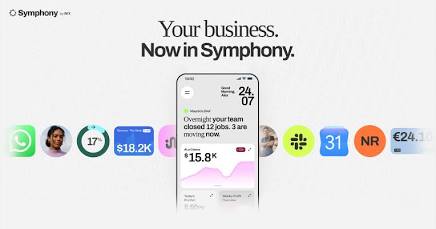
Home Screen Dashboards Built for Your Business
Symphony builds a personalised home screen dashboard based on your business, showing you
what matters most right now: traffic numbers, client status, campaign results, upcoming tasks.
You are not digging through menus. The AI surfaces what needs your attention, every time you
open the app
Works Across Mobile and Desktop
Symphony is a standalone app. No website required. You can run it on your phone or desktop,
and it stays in sync. This makes it genuinely usable for students and early-stage founders who
are still figuring out their setup
Who Is Symphony AI Tool Actually For?
Students Running Side Projects
If you are doing freelance web development, graphic design, content writing, or any kind of
service work while still in college, you need to manage clients, deadlines, and communication.
Symphony handles all of that so your side project actually runs like a business
Freshers Building Their First Client Base
Getting your first few clients is hard. Staying on top of follow-ups and communication while
learning the craft is even harder. The Maestro keeps you organised and makes sure no lead or
client falls through the cracks.
Small Business Owners in India
Whether you run a tuition centre, a local shop, a photography business, or a digital marketing
agency, Symphony’s AI agents for entrepreneurs take over the repetitive admin work so you can
spend time growing
Early-Stage Founders
If you are building something from scratch and wearing ten hats, Symphony acts as the
operations layer you cannot afford to hire yet. It brings structure to the chaos of running a startup
with a small team.
How to Get Started with Symphony
- Go to symphony.wix.app
- Sign in or create a free Wix account. No website needed.
- Set up your business profile. Tell Symphony about your business: what you do, who your
clients are, and what your goals look like. - Start talking to The Maestro. Describe a task or problem, and it gets to work.
- Review and approve outreach or actions. Symphony always shows you what it is doing
before it goes out. - Watch your dashboard take shape. As you use it, Symphony builds a personalised home
screen around your business
The free plan gives you access to core features so you can try it without any upfront cost.
Practical Use Cases for Indian Students and Entrepreneurs
Freelance developer managing 3 clients at once
You are building websites for three different clients, all in different stages. Symphony tracks each
project, sends reminders, follows up on feedback, and drafts client updates, so nothing gets
forgotten.
Student selling digital notes or study resources
You post on Instagram and Telegram, collect payments, and reply to buyers manually. Symphony
can manage the outreach, send confirmation messages, and keep track of who has paid and who
hasn’t
Tuition teacher or coaching institute
Schedule demos, send reminders before class, follow up with parents who enquired last week.
The AI agent handles the repetitive parts of running a small education business
Freelance content writer
Pitch clients, track deliverables, send invoices, follow up on payments. Symphony’s task
automation keeps the business side running while you write
Pros of Using Wix Symphony AI
- Saves real time. Client follow-ups, scheduling, and outreach happen automatically.
- No learning curve. Just talk to The Maestro like you would text a colleague.
- Built for small scale. Designed for solo operators and small teams, not enterprise.
- Multi-channel outreach. WhatsApp, SMS, and email from one place.
- Free plan available. You can test it without paying.
- Backed by Wix’s 20 years of SMB data. Not a generic AI tool, but one built around real
small business patterns.
What Makes Symphony Different from Other AI Tools?
Most AI tools for small business give you a chatbot or a text generator. Symphony is different
because it is built around getting things done, not just answering questions.
The distinction is this: instead of you telling the AI what to write, Symphony’s agents take
ownership of whole tasks, outreach, follow-ups, scheduling, content, and run them end to end.
You stay in the loop (you always approve before anything goes out), but you are not doing the
work yourself.
That makes it closer to having a junior assistant team than a smarter search engine.
Conclusion: Is Symphony AI Tool Worth It?
Okay Now I will share with you my over all experience on Symphony Ai this is very Best Ai when you already run your business online not offline, i will suggest this ai to mostly students who in Studying in tech courses like BCA, B.sc and B.tech etc… but you are just a normal working professional you can also use this ai you will get 2 ai agents free and 500 credit for every months( But this is currently free trial) That is enough for your small business. Even I write send my some details to this ai and they create personal ai agent for my Website but honestly.
This Ai take a time to working and including thinking(reasoning) function answer loading approximate 2 minutes to answer. But one thing i love most i can used 8 skill one by one to giving different task like generate some document, some images, some articles and some reminder auto function symphony give me different ai agents for that. So I really love this ai. If you Like that type Tools so must use ai Artlist.
| Category | Details |
|---|---|
| AI Tool Name | Symphony AI Tool by Wix |
| What Is It? | An AI-powered business assistant designed to help entrepreneurs manage everyday business operations. |
| Main AI Assistant | The Maestro — understands your business goals and coordinates specialized AI agents. |
| How It Works | Uses a team of specialized AI agents, with each agent focused on different business tasks. |
| Content Creation | Helps with blog posts, social media captions, and website copy. |
| Marketing | Supports email campaigns and promotional activities. |
| Task Automation | Handles follow-ups, reminders, scheduling, and task tracking. |
| Client Outreach | Supports WhatsApp, SMS, and email outreach according to the PDF. |
| Business Dashboard | Creates a personalized dashboard showing relevant business information, tasks, client status, and campaign results. |
| Human Approval | Users can review and approve outreach or actions before they are sent. |
| Works Without Wix Website? | Yes. The PDF describes Symphony as a standalone app that does not require a Wix website. |
| Platforms | Mobile and desktop. |
| Best For | Freelancers, students with side projects, freshers, small-business owners, and early-stage founders. |
| Freelancer Use | Manage clients, projects, reminders, feedback, and client updates. |
| Student Use | Manage customer communication, confirmations, outreach, and payment tracking for small projects. |
| Education Business Use | Schedule demos, send reminders, and follow up with prospective customers. |
| Content Writer Use | Manage client pitches, deliverables, invoices, and payment follow-ups. |
| Main Benefit | Reduces repetitive administrative work and gives entrepreneurs more time for their core work. |
| What Makes It Different? | It is positioned as more than a chatbot: its AI agents are designed to execute business tasks and workflows. |
| Free Plan | The PDF states that a free plan provides access to core features, with paid plans for higher usage and advanced capabilities. |
| Access | symphony.wix.app is given as the access point in the PDF. |
| Setup | Create/sign in to a Wix account → provide business information → tell The Maestro what you need → review and approve actions. |
| Key SEO Topic | Symphony AI Tool by Wix |
| Related Topics | Symphony AI, Wix Symphony, AI business assistant, AI agents, small-business AI, freelance AI tools, AI tools for students. |
Frequently Asked Questions (FAQ) For Symphony Ai
Q: What is Symphony AI tool?
A: Symphony is an AI-powered business assistant made by Wix. It uses a team of specialist
AI agents to handle tasks like client outreach, scheduling, follow-ups, and content, all
coordinated by an AI called The Maestro.
Q: Is Symphony by Wix free?
A: Yes, Symphony has a free plan that gives you access to core features. Paid plans are
available for higher usage and more advanced capabilities.
Q: What is the difference between Symphony and The Maestro?
A: Symphony is the product, the full platform. The Maestro is the AI assistant you talk to inside
Symphony. The Maestro understands your business and assigns tasks to the right specialist
AI agents
Q: Can Indian students and freelancers use Symphony?
A: Yes. Symphony is well-suited for Indian freelancers, students running side projects, and
early-stage entrepreneurs. It works on WhatsApp, SMS, and email, the channels most
commonly used for business communication in India.
Q: Does Symphony work without a Wix website?
A: Yes. Symphony is a standalone app. You do not need a Wix website to use it. You can
access it at symphony.wix.app with any free Wix account.
Q: What can Symphony’s AI agents actually do?
A: Symphony’s AI agents can write content, manage email campaigns, send client outreach
on WhatsApp or SMS, track tasks, schedule follow-ups, and build personalised dashboards,
depending on your business needs.
4 thoughts on “Symphony AI by Wix: Features, Benefits & How It Works 2026”