How To Start To Python From Zero To Hero( Complete Beginner’s Roadmap )

Introduction
When I first saw Python, I felt like it was something only grown-ups learned. But it’s my most stupid myth ever, even a Student who is studying in 12th he/she can also learn Python easily. Believe me, you too can learn Python, but for that, you need to have a “never give up” attitude. In this article, I will share my personal experience of learning Python.
So, let me introduce myself first. I’m Satish Surwade, basically a tech student just like you. I’ve had both good and bad experiences while learning programming languages like C, C++, Python, JavaScript, and many more. In this blog you will leaning complete roadmap zero to your first project So let’s begins !
Why Learn Python? (And Why Now)
Python is more than just another programming language. It has become a powerful tool used in web development, artificial intelligence, machine learning, data science, automation, cybersecurity, and software development. What makes Python especially interesting for beginners is its simple and readable syntax. You can start writing useful programs without spending weeks trying to understand complicated code.
But the real question is: Why learn Python in 2026?
The answer is simple — technology is changing quickly, and Python is right in the middle of that change.
From AI-powered applications and machine learning models to everyday task automation, Python is being used to solve real-world problems. If you want to explore fields like Generative AI, data analytics, automation workflows, or machine learning, having a strong Python foundation can give you a significant advantage.
Reason Why I Choose Python Programming Language To Learn ?
Four years ago, I was working in different companies and markets. During that time, I noticed something that really bothered me. People who were educated and had skills were not always respected, and the salaries were also pretty low.
I started thinking, “Then what’s the point of studying if I still have to work in a place where my education and skills are not valued?”
This thought made me want something different. I wanted a career that was professional, paid well, and also challenged my brain. I wanted to do something where I could actually use what I learned, solve problems, and work with computers.
While searching for different career options, I came across B.Tech. But the fees were too high for me, so I decided to go with BCA at a Tier-3 college. I knew it might not be the perfect option, but for me, it was a practical way to enter the technology field.
During my BCA journey, I was introduced to Python programming. And honestly, that changed things for me.
For the first time, I found something that I actually enjoyed learning. I liked writing code, solving problems, and seeing my ideas turn into something that worked.
That was the moment I realized, “Yes, this is what I want to do.”
Environment Setup For Python
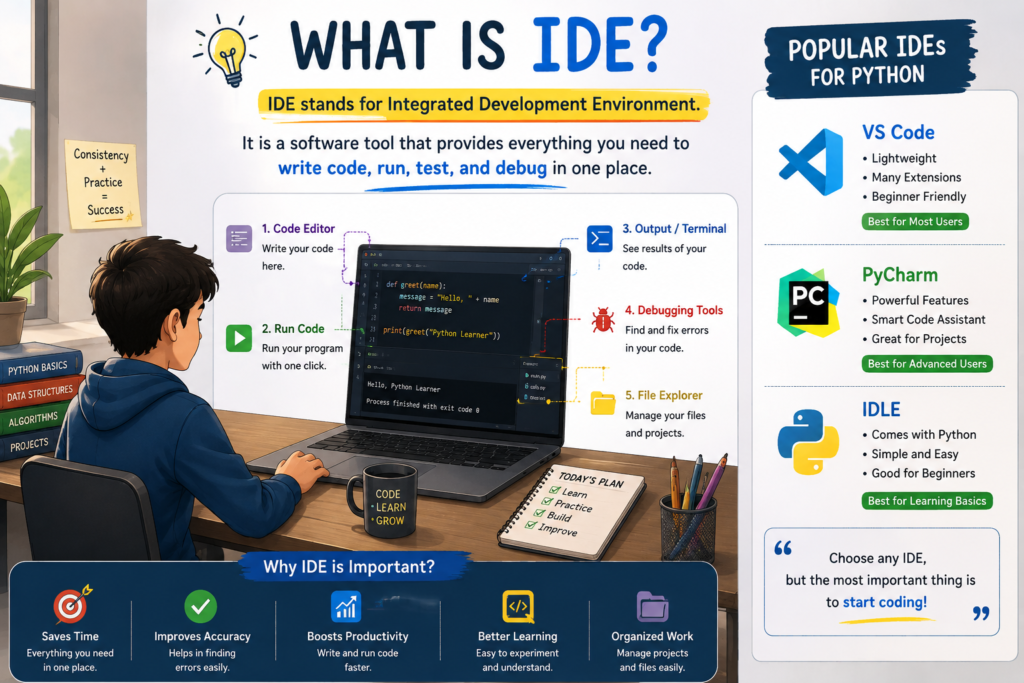
If you are ready to learn python so sit front of your Laptop or Computer And start to Setup with me. Python is not installed in your Computer by default You need to install in your system then you can work with that language now Before we are start to install python I want to explain somethings like IDE. IDE stands for Integrated Development Environment Is a software tool that provides everything you need to write code, run, test, and debug code in one place. For python, Popular options include VS Code, PyCharm, and IDLE.
As Experience Programmer I will Recommend you starts with VS Code Because it is free, open source, simple, flexible, and easy to customize.
1. Open browser in your laptop or computer and search python.org
2. Then Go to Download you found latest version of Python example: Python 3.14.7 Double Click on that and downloading will start
3. After complete Downloading double click on .exe file And give the permission.
4. Before Install Now, Make sure you check the “Add Python.exe to PATH” option. This small step is important becasue it allows you to runpython directly from your Command Prompt or terminal.
5. Once the installation complete open your Terminal or Command Prompt and type python –version. If You Show python’s Latest version congratulations, your Python setup is successful. 🎉
6. Install VS Code for Write Code of Python open New tab and search VS Code Download
7. select your OS type then click on that os icon file will download automatically and open .exe file by double click
8. accept term and condition then go to next also check 3 box upper side and click on Finish.
9. Done ! here your all process complete.
Python Basics — Where Should You Start?
Once you have installed Python, the next question is usually, “What should I learn first?” This is where many beginners get stuck. Search for a Python tutorial and you will find hundreds of topics—variables, loops, functions, lists, dictionaries, classes, modules, libraries, and much more.
The good news is that you don’t need to learn everything at once.
If you’re learning Python for the first time, start with the concepts that you will use again and again. Variables, data types, conditional statements, loops, functions, strings, and basic data structures should be your foundation. Start with variables and data types. Learn how Python stores information such as text, numbers, and Boolean values. Then move to if, elif, and else so you can make your programs take decisions.
After that, learn for and while loops. Loops are important because they let you repeat a task without writing the same code again and again. Once you’re comfortable with loops, learn functions. Functions help you break a large problem into smaller, reusable pieces.
You don’t have to memorize every syntax rule. Focus on understanding why and when you would use a particular concept.
For a beginner, that core usually includes variables, data types, conditions, loops, functions, strings, lists, dictionaries, and basic error handling. Once these concepts become comfortable, learning libraries and frameworks becomes much easier.
| Core Concept | Why It Matters | Priority |
| Variables | Store and work with information | Very High |
| Data Types | Understand different kinds of values | Very High |
| Conditions | Make decisions in programs | Very High |
| Loops | Repeat tasks efficiently | Very High |
| Functions | Reuse and organize code | Very High |
| Strings | Work with text and user input | High |
| Lists & Dictionaries | Store and manage collections of data | High |
| Error Handling | Understand and manage common errors | Medium |
| OOPs | Build larger, structured applications | Later |
The biggest beginner mistake is trying to finish Python before actually using Python. Watching tutorials for weeks may feel productive, but programming is a skill you develop by writing code. Learn one concept, write some code, make mistakes, fix those mistakes, and then move to the next concept. That cycle is much more valuable than simply collecting tutorials.
Free Python Resources That Actually Help
There is no shortage of free Python learning resources online. The real challenge is choosing a few good ones instead of jumping between ten different courses. If you prefer learning through videos, CodeWithHarry and Apna College are useful options for Hindi-speaking beginners. Their beginner Python courses cover topics such as variables, data types, conditions, loops, functions, data structures, and projects.
For English learners, freeCodeCamp is another popular option for long-form programming courses and hands-on learning.
You should also keep the official Python documentation bookmarked. It includes the official Python tutorial, setup instructions, language reference, and standard-library documentation. It may feel difficult at first, but learning to read documentation is an important skill for every programmer. W3Schools is particularly useful when you want short explanations and quick practice. Its Python tutorial covers variables, data types, functions, loops, modules, file handling, and many other topics. It also provides interactive exercises and coding challenges.
Projects — When Should You Start?
One of the most common mistakes beginners make is saying:
“First, I’ll learn everything. Then I’ll start building projects.”
The problem is that you will probably never feel like you’ve learned “everything.”
Projects should start much earlier.
You don’t need advanced Python knowledge to build your first project. In fact, a small project can show you exactly why variables, conditions, loops, functions, and lists are useful.
After roughly the first few weeks of learning the basics, start experimenting with small projects. You don’t have to wait until Day 30 exactly—the right time depends on how consistently you’re learning.
Here are some beginner-friendly ideas:
- Simple Calculator
- Number Guessing Game
- Quiz Application
- To-Do List
- Password Generator
- Student Grade Calculator
- Contact Book
- Expense Tracker
- Simple Text-Based Game
The goal isn’t to build something impressive immediately. The goal is to learn how to take a problem and turn it into code.
For example, your Student Grade Calculator might use variables for marks, conditions to determine grades, and functions to keep the code organized. Suddenly, the concepts you learned from a tutorial have a real purpose. That is where Python starts becoming more than just a programming language—it becomes a tool for solving real problems.
Zero to Hero: A Realistic Python Learning Timeline
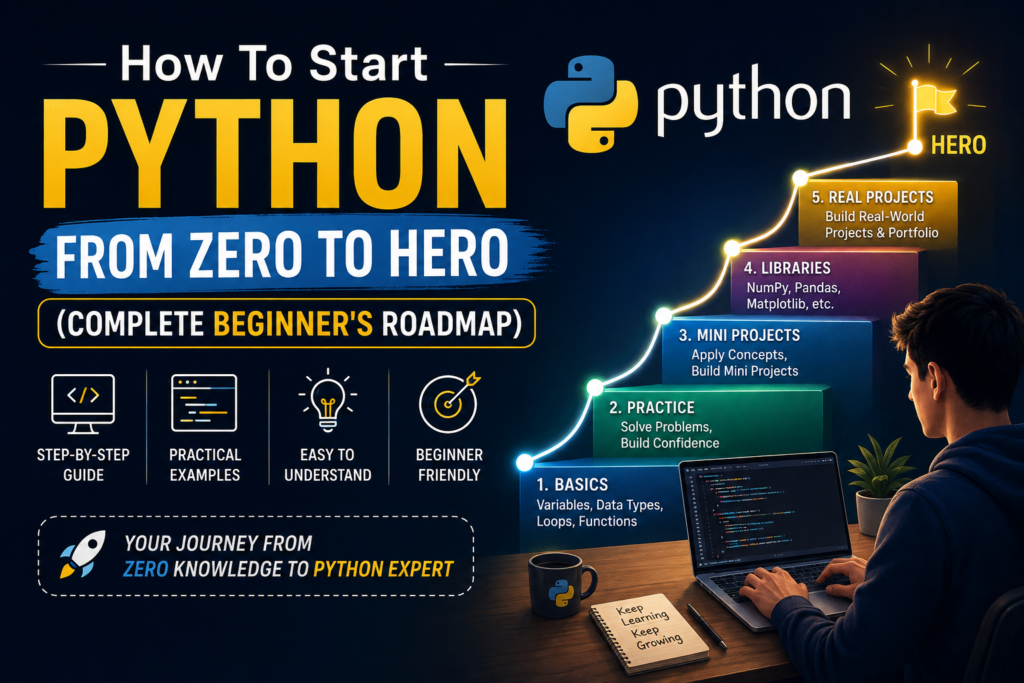
You can learn the syntax quickly, but developing problem-solving skills and programming confidence takes practice. Your timeline will depend on how much time you can consistently give to learning. For someone practicing around 1–2 hours a day, this can be a reasonable beginner roadmap:
| Time | Main Focus | What You Should Be Able to Do |
| Week 1 | Python fundamentals | Write basic programs and understand syntax |
| Week 2 | Conditions, loops & functions | Solve simple programming problems |
| Week 3 | Lists, dictionaries & strings | Work with and manipulate data |
| Week 4 | Practice + mini projects | Build small Python applications |
| Month 2 | NumPy, Pandas & basic libraries | Start working with real datasets |
| Month 3 | Real projects | Build portfolio-level projects |
| After Month 3 | Specialization | Explore Data Science, AI, Web Development, Automation, etc |
Week 1–2: Build Your Foundation
Start with syntax, variables, data types, operators, conditions, loops, and functions. Don’t worry about advanced topics yet. Your goal is to understand how Python works and become comfortable writing small programs.
Week 3–4: Practice and Build
This is where you should spend less time watching tutorials and more time coding. Solve beginner problems and start building mini projects. If you get stuck, that’s actually a good thing. Search for the problem, read the error message, check documentation, and try again.
Month 2: Explore Python Libraries
Once your fundamentals are reasonably strong, you can start exploring libraries such as NumPy and Pandas, especially if you’re interested in data analysis or data science. NumPy is commonly used for numerical computing, while Pandas is designed for working with structured data such as tables and CSV files. Don’t try to learn every library at once. Choose libraries based on what you want to build.
Month 3 and Beyond: Real Projects and Portfolio
Now it’s time to move from tutorial-based learning to real-world projects.
Build projects that solve actual problems. Upload your code to GitHub, write a clear README, explain what you learned, and keep improving the project. Your portfolio doesn’t need twenty projects. A few well-built projects that you can explain confidently are much more useful than a folder full of copied tutorial projects.
And remember: there is no single “zero to hero” deadline.
Some people may become comfortable with Python in three months, while others may need six months or longer. That’s completely normal.
Don’t compare your timeline with someone else’s
My Experience on Learning Python :
Initially, I followed numerous channels and just watched videos, but I never practiced for more than two or three weeks; I never built any actual projects—I only took notes and watched content. While watching the videos, it felt like I understood everything and could handle it all, but in reality, that wasn’t the case; whenever I tried writing code in VS Code, I couldn’t make sense of anything. I eventually took a break, and a year or two passed in this manner. However, during my final year, I finally started writing code practically on a daily basis. That’s when I began to enjoy learning Python; I built data analyst projects and even received internship offers from two major cities.
Bottom Line : Coding is just the game of Practice. You Not Master Python in one day by watching 3 hours tutorial video.
