
Key Takeaways
- Operators in Python are symbols or keywords used to perform operations on values and variables.
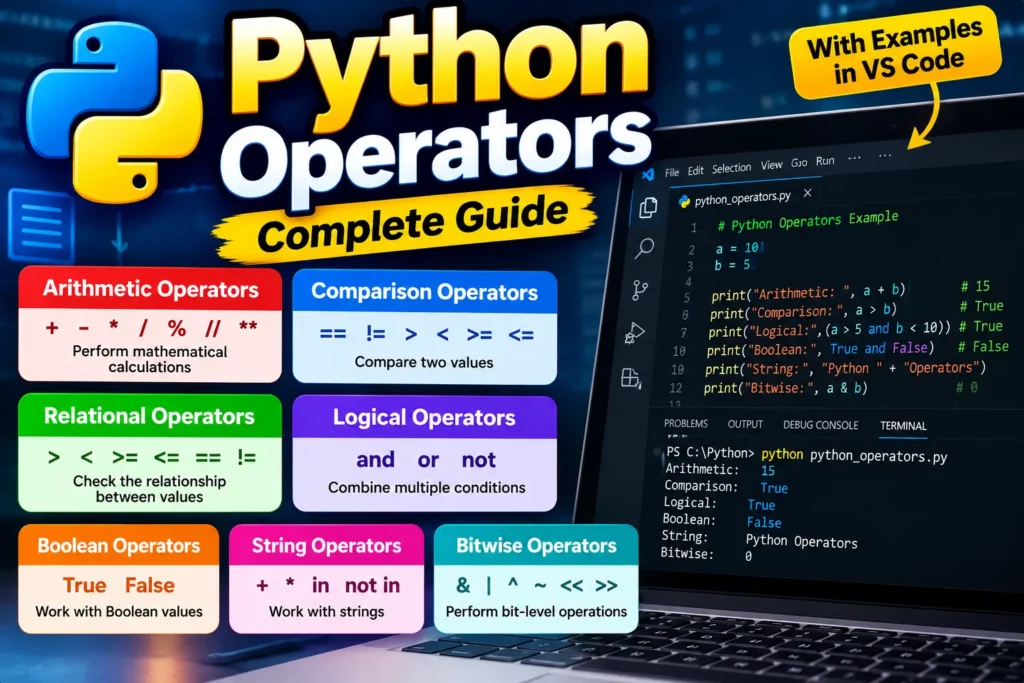
- Python operators are commonly grouped into categories such as arithmetic, comparison, logical/Boolean, assignment, bitwise, identity, and membership operators.
- Arithmetic operators such as
+,-,*,/,%,//, and**are used for mathematical calculations. - Comparison Operators in Python, such as
==,!=,>,<,>=, and<=are used to compare values and commonly produceTrueorFalse. - Relational Operators in Python are a commonly used term for operators that compare relationships between values.
<,>,<=, and>=. - Logical Operators in Python—
and,or, andnot—are used to combine or modify conditions. - Boolean Operators in Python are commonly used to work with truth values and conditional expressions.
- String Operators in Python commonly include
+for joining strings,*for repeating strings, andin/not infor membership checks. - Bitwise Operators in Python, such as
&,|,^,~,<<, and>>work at the bit level and are mainly useful for binary and low-level operations. - The difference between
=and==, and between==andisis important for avoiding common Python programming mistakes. - Operator precedence determines the order in which Python evaluates expressions. Parentheses can make complicated expressions easier to understand.
- The best way to learn Python operators is to practice them with small, real-world examples rather than only memorizing their definitions.
When you start learning Python, you’ll quickly see symbols and keywords such as +, -, ==, and, or, in, and &.
These are called operators in Python. They allow you to perform calculations, compare values, combine conditions, check membership, manipulate bits, and work with different types of data.
For example:
price = 500
quantity = 3

total = price * quantity

print(total)
Output:
1500Here, * is an operator. It tells Python to multiply price by quantity.
Operators become especially important when you start writing if statements, loops, functions, data-processing programs, and real-world applications.
In this guide, you’ll learn the major types of Python operators, including Boolean Operators in Python, Logical Operators in Python, Comparison Operators in Python, Relational Operators in Python, String Operators in Python, Bitwise Operators in Python, and arithmetic operators. Before you start this tutorial, you must know about data types and variables, and then you can continue
What Are Operators in Python?
An operator is a symbol or keyword that tells Python to operate on one or more values.
The values used with an operator are called operands.
For example:
10 + 5Here:
10is the first operand.+is the operator.5is the second operand.
Python evaluates the expression and returns:
15A simple real-world example is an online shopping cart.
Suppose a customer buys 4 products and each product costs ₹250:
price = 250
quantity = 4

total = price * quantity

print(total)
Output:
1000The operator makes the calculation possible.
Python’s expression syntax includes arithmetic, shifting, bitwise, comparison, Boolean, membership, and identity operations.
How Many Operators in Python?
There isn’t one universally correct number because Python operators can be counted in different ways: by operator category, by individual operator symbol/keyword, or by syntactic form.
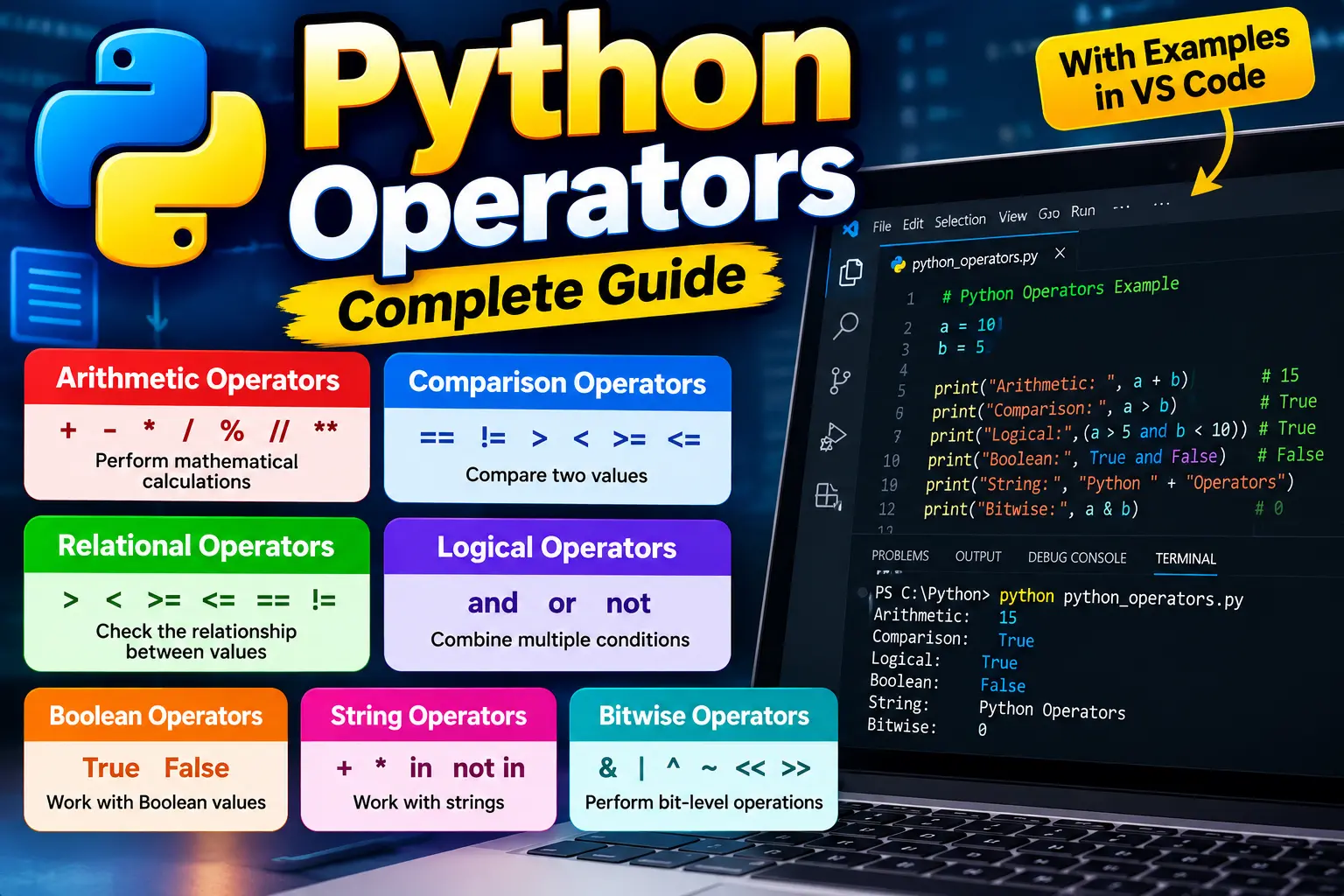
For beginners, Python operators are commonly grouped into seven major categories:
- Arithmetic operators
- Comparison operators
- Logical or Boolean operators
- Assignment operators
- Bitwise operators
- Identity operators
- Membership operators
There are also important operations that are often discussed separately, such as operators used with strings.
The Python language reference itself describes operators by expression syntax rather than stating that Python has one fixed total number of operators.
So, when someone asks “How many operators in Python?”, the most accurate beginner-friendly answer is:
Python has seven commonly taught operator categories, but the exact number of individual operators depends on how you count them.
This distinction is useful because terms such as String Operators in Python are commonly used in tutorials, even though strings use general operators such as +, *, and membership operators rather than belonging to a separate official operator category.
Types of Operators in Python
Let’s look at each important category with simple examples.
1. Arithmetic Operators in Python
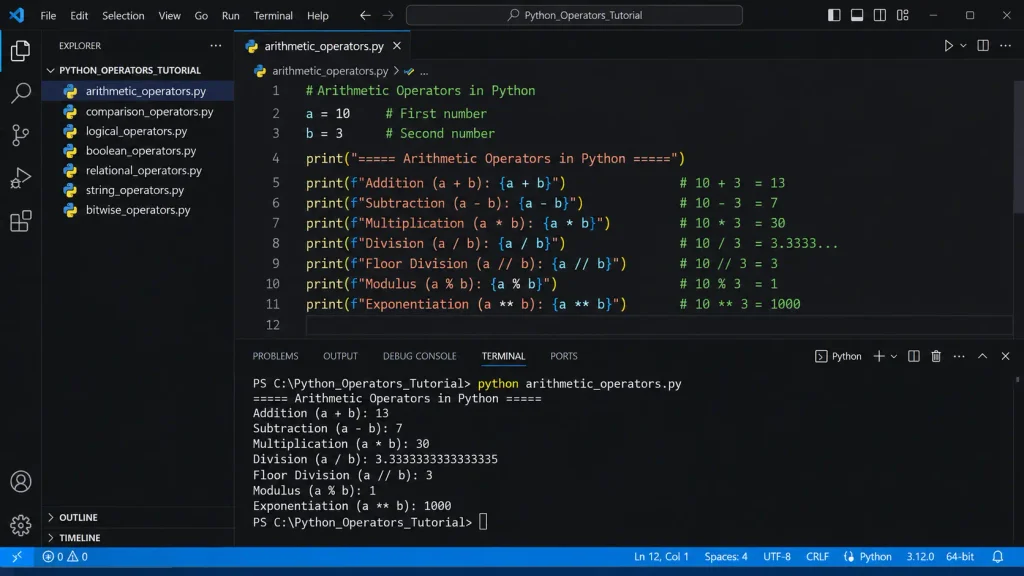
Arithmetic operators perform mathematical calculations.
Arithmetic operators table
| Operator | Name | Example | Result |
|---|---|---|---|
+ | Addition | 10 + 5 | 15 |
- | Subtraction | 10 - 5 | 5 |
* | Multiplication | 10 * 5 | 50 |
/ | Division | 10 / 5 | 2.0 |
// | Floor Division | 10 // 3 | 3 |
% | Modulus | 10 % 3 | 1 |
** | Exponentiation | 2 ** 3 | 8 |
Python supports these standard arithmetic operations, with / producing a floating-point result for numeric operands and // performing floor division.
Example
a = 20
b = 6

print(a + b)
print(a - b)
print(a * b)
print(a / b)
print(a // b)
print(a % b)
print(a ** 2)
Output:
26
14
120
3.3333333333333335
3
2
400
Real-world example
Imagine you are calculating the total price of products:
product_price = 799
quantity = 2

total = product_price * quantity

print("Total:", total)
Output:
Total: 1598Arithmetic operators are everywhere in programming: shopping carts, salary calculations, billing systems, marks calculations, statistics, and financial applications.
2. Comparison Operators in Python
Comparison Operators in Python are used to compare two values.
They are especially useful in conditions such as if, whileand filtering logic.
Common comparison operators include:
| Operator | Meaning |
|---|---|
== | Equal to |
!= | Not equal to |
> | Greater than |
< | Less than |
>= | Greater than or equal to |
<= | Less than or equal to |
Python comparison syntax also includes is, is not, in, and not in in its comparison/membership/identity expressions.
Example
age = 20

print(age == 20)
print(age > 18)
print(age < 18)
print(age != 25)
Output:
True
True
False
True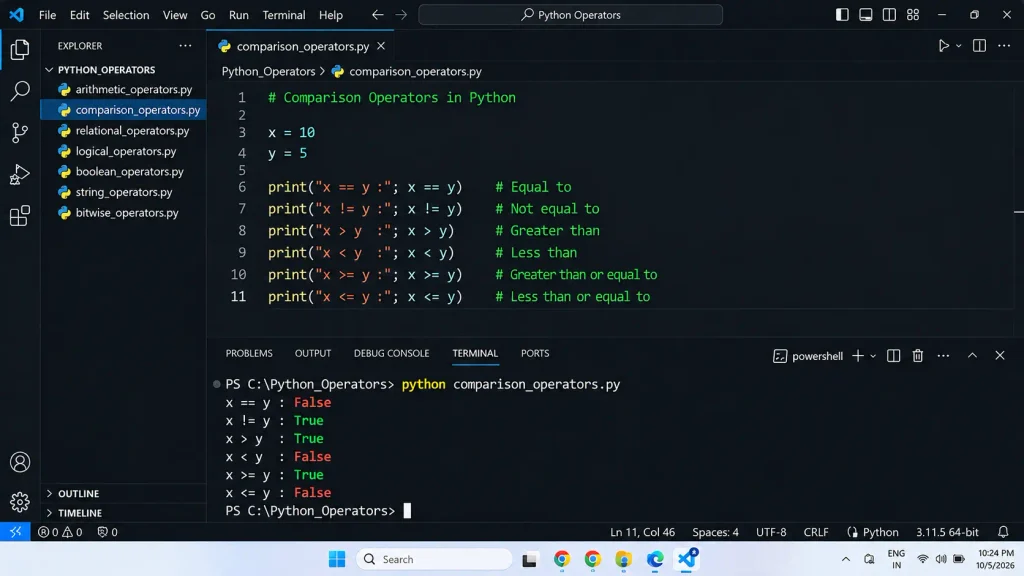
How to Use Comparison Operators in Python
You normally use comparison operators when your program needs to make a decision.
For example:
marks = 75

if marks >= 40:
    print("Pass")
else:
    print("Fail")
Output:
PassThe expression:
marks >= 40asks Python whether marks is greater than or equal to 40.
Because 75 >= 40 is true, the program prints Pass.
Another practical example
Suppose a website allows users to access a feature only when they are at least 18 years old:
age = 21

if age >= 18:
    print("Access allowed")
else:
    print("Access denied")
Output:
Access allowedComparison operators return a Boolean result in normal comparison use: True or False. Python also supports chained comparisons such as 18 <= age < 60.
3. Relational Operators in Python
The term Relational Operators in Python is commonly used for operators that compare relationships between values, such as:
<
>
<=
>=
Many learning resources use relational operators and comparison operators almost interchangeably.
For example:
x = 10
y = 20

print(x < y)
print(x > y)
print(x <= y)
print(x >= y)
Output:
True
False
True
False
Important distinction
In a broader Python documentation context, “comparison” is the more useful official term because Python’s comparison syntax covers equality, ordering, identity, and membership tests.
So for SEO and beginner education, you can target both phrases:
Comparison Operators in Python
and
Relational Operators in Python
without teaching them as two completely different operator families.
4. Logical Operators in Python
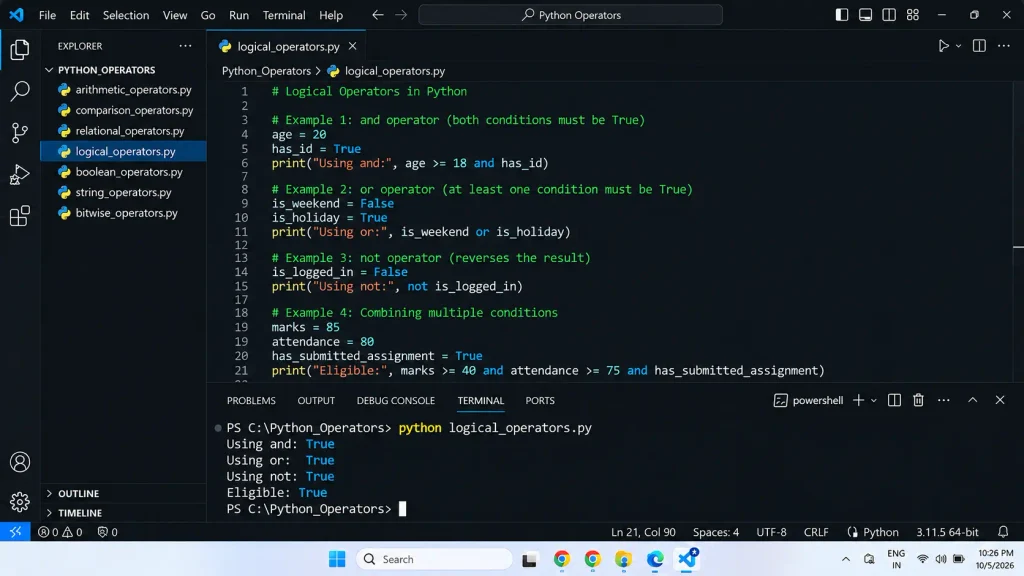
Logical operators combine or modify conditions.
The three Boolean operations are:
and
or
not
Python’s documentation calls these Boolean operations. They are commonly called logical operators in programming tutorials.
What Are Logical Operators in Python?
Logical operators allow your program to work with multiple conditions.
and
and requires both conditions to be true for the combined condition to be true.
age = 25
has_id = True

if age >= 18 and has_id:
    print("Entry allowed")
Output:
Entry allowedBoth conditions are true.
or
or succeeds when at least one condition is true.
day = "Sunday"

if day == "Saturday" or day == "Sunday":
    print("Weekend")
Output:
Weekendnot
not reverses a truth value.
is_logged_in = False

if not is_logged_in:
    print("Please log in")
Output:
Please log inHow to Use Logical Operators in Python
A common real-world example is checking whether a user can log in.
username = "satish"
password = "12345"

if username == "satish" and password == "12345":
    print("Login successful")
else:
    print("Invalid username or password")
Output:
Login successfulHere, and combines two comparison expressions.
You can also combine multiple conditions:
age = 25
country = "India"
verified = True

if age >= 18 and country == "India" and verified:
    print("User is eligible")
Logical operations use truth testing, and and/or use short-circuit evaluation. An important Python detail is that and and or can return one of their operands rather than always returning the Boolean values True or False.
For example:
print(0 or 10)
print("Python" and "Coding")
Output:
10
Coding
This is one reason understanding Python’s logical operators is more useful than simply memorizing “and means both” and “or means either.”
5. Boolean Operators in Python
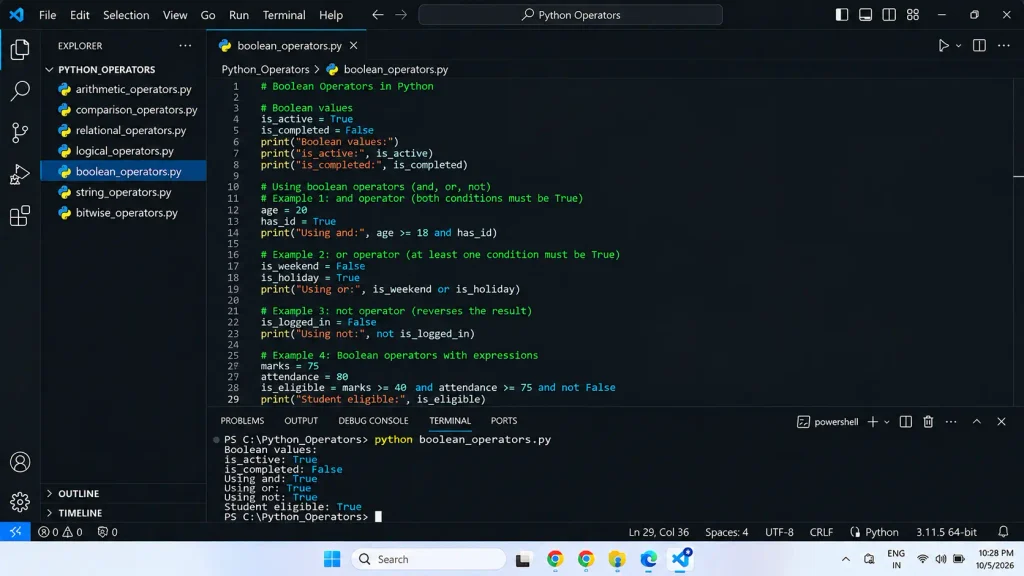
The phrase Boolean Operators in Python generally refers to:
and
or
not
These operators work with truth values and truth testing.
Python has two Boolean constants:
True
False
Example:
is_python_easy = True
is_java_easy = False

print(is_python_easy)
print(is_java_easy)
Output:
True
False
You can use Boolean expressions with conditions:
temperature = 30

print(temperature > 25)
Output:
TrueThe expression temperature > 25 produces a Boolean result.
Boolean values in practical programming
Suppose you want to check whether a product is available:
stock_available = True

if stock_available:
    print("Product is available")
Output:
Product is availableThis simple pattern appears throughout web applications, APIs, automation scripts, data processing, and software development.
6. String Operators in Python
Python doesn’t define “string operators” as a completely separate official operator category. Instead, several normal operators have useful behavior when working with strings.
The most common ones are:
+
*
in
not in
Python’s tutorial explicitly demonstrates string concatenation with + and repetition with *.
String Concatenation Using +
The + operator joins strings.
first_name = "Satish"
last_name = "Surwade"

full_name = first_name + " " + last_name

print(full_name)
Output:
Satish SurwadeThis is called string concatenation.
String Repetition Using *
The * operator can repeat a string.
message = "Python "

print(message * 3)
Output:
Python Python PythonThis behavior is a form of sequence repetition.
String Membership Using in
The in operator checks whether a substring exists inside a string.
text = "I am learning Python"

print("Python" in text)
Output:
TrueYou can also use not in:
text = "I am learning Python"

print("Java" not in text)
Output:
TruePython defines in and not in as membership tests, and for strings they test whether one string is a substring of another.
Practical example
Imagine a simple system checking whether an email address contains an expected domain:
email = "user@example.com"

if "@example.com" in email:
    print("Valid example domain")
Output:
Valid example domainFor production email validation, you would normally use more robust validation rules, but this demonstrates how string membership works.
7. Bitwise Operators in Python
Bitwise Operators in Python work at the binary-bit level of integer values.
The main bitwise operators are:
| Operator | Name | |
|---|---|---|
& | Bitwise AND | |
| ` | ` | Bitwise OR |
^ | Bitwise XOR | |
~ | Bitwise NOT | |
<< | Left Shift | |
>> | Right Shift |
Python’s expression reference defines these bitwise operations and their precedence.
Bitwise operators can look confusing at first, so let’s use binary numbers.
Bitwise AND &
a = 6
b = 3

print(a & b)
Binary representation:
6 = 110
3 = 011
-------
    010
Output:
2Bitwise OR |
a = 6
b = 3

print(a | b)
Binary:
110
011
---
111
Output:
7Bitwise XOR ^
XOR returns a set bit where the corresponding bits are different.
a = 6
b = 3

print(a ^ b)
Binary:
110
011
---
101
Output:
5Bitwise NOT ~
x = 5

print(~x)
Output:
-6For Python integers, bitwise inversion follows the identity. ~x == -(x + 1).
Left Shift <<
x = 5

print(x << 1)
Output:
10Right Shift >>
x = 10

print(x >> 1)
Output:
5Bitwise operators are useful in areas such as low-level programming, binary data processing, flags, protocols, performance-sensitive operations, and some algorithmic problems.
For a beginner, understanding the basic binary behavior is more important than trying to memorize every use case immediately.
Other Important Python Operators
The operators above are the main topics covered in this guide, but Python also has other important operator categories.
Assignment Operators
Assignment operators are used to assign or update values.
x = 10
x += 5

print(x)
Output:
15Common assignment forms include:
=
+=
-=
*=
/=
%=
//=
**=
&=
|=
^=
<<=
>>=
Identity Operators
Identity operators are:
is
is not
They test whether two references point to the same object.
a = [1, 2, 3]
b = a

print(a is b)
Output:
TrueBe careful not to replace == with is.
== compares values.
is checks object identity. Python documents these as separate concepts.
Membership Operators
Membership operators are:
in
not in
Example:
languages = ["Python", "Java", "C"]

print("Python" in languages)
Output:
TrueThey are especially useful when searching lists, sets, tuples, dictionaries, and strings. In a dictionary, in tests for keys.
Operator Precedence in Python
When an expression contains multiple operators, Python doesn’t simply evaluate everything from left to right. Operator precedence determines which operations are performed first.
For example:
result = 10 + 5 * 2

print(result)
Output:
20Python evaluates multiplication before addition:
5 * 2 = 10
10 + 10 = 20
You can use parentheses to make the intended order explicit:
result = (10 + 5) * 2

print(result)
Output:
30Some important precedence levels, from higher to lower, include exponentiation, unary operations, multiplication/division/floor division/modulo, addition/subtraction, shifts, bitwise operations, comparisons, not, and, and or.
Practical tip
When an expression becomes difficult to read, use parentheses.
This:
total = price + tax * quantitymay be technically correct depending on the intended logic, but this can be clearer:
total = price + (tax * quantity)Readable code is usually easier to maintain and debug.
Common Mistakes When Using Python Operators
Mistake 1: Using = instead of ==
This is a very common beginner mistake.
Incorrect:
if age = 18:
    print("Adult")
Correct:
if age == 18:
    print("Adult")
= is assignment.
== is equality comparison.
Mistake 2: Confusing is and ==
Don’t normally use:
a is bwhen you intend to compare values.
Use:
a == bfor value equality.
Use is when object identity is what you actually need.
Mistake 3: Confusing and with &
These operators are not interchangeable.
For conditions:
age >= 18 and verifiedUse logical/Boolean and.
For bit-level integer operations:
a & bUse bitwise AND.
Python specifically distinguishes Boolean operations from bitwise operations.
Mistake 4: Forgetting operator precedence
Consider:
result = 10 + 2 * 5The result is:
20not:
60When in doubt, add parentheses.
Mistake 5: Mixing strings and numbers
This causes an error:
age = 26

print("My age is " + age)
A safer approach is:
age = 26

print("My age is", age)
Or use an f-string:
age = 26

print(f"My age is {age}")
Output:
My age is 26Practical Example: Using Multiple Python Operators Together
Let’s build a small student eligibility example.
marks = 78
attendance = 85
has_completed_assignment = True

if marks >= 40 and attendance >= 75 and has_completed_assignment:
    print("Student is eligible")
else:
    print("Student is not eligible")
Output:
Student is eligibleThis small program uses several concepts:
>=→ comparison operatorand→ logical/Boolean operator=→ assignment operator
This is how operators appear in real programs: they work together rather than existing in isolation.
Quick Python Operators Cheat Sheet
| Category | Common Operators | Main Purpose |
|---|---|---|
| Arithmetic | + - * / // % ** | Mathematical calculations |
| Comparison | == != > < >= <= | Compare values |
| Logical / Boolean | and or not | Combine or modify conditions |
| Assignment | = += -= *= /= | Assign/update values |
| Bitwise | & | ^ ~ << >> | Work with bits |
| Identity | is is not | Check object identity |
| Membership | in not in | Check membership |
| String operations | + * in not in | Join, repeat, and search strings |
Why Are Operators Important in Python?
Operators are one of the foundations of Python programming.
Without them, many everyday programming tasks would become much harder.
You use operators when you:
- calculate prices and totals
- compare marks or ages
- validate login conditions
- search for text
- check whether an item exists in a list
- process binary values
- update variables
- write loops and conditions
- build algorithms
- analyze data
For example, even a simple login system may use assignment, comparison, and logical operators together:
username = "satish"
password = "python123"

if username == "satish" and password == "python123":
    print("Login successful")
Understanding operators well will make future topics such asif-elseloops, functions, lists, data structures, and algorithms much easier to understand.
Frequently Asked Questions
What are operators in Python?
Operators in Python are symbols or keywords that tell Python to perform operations on values or objects. Examples include +, -, ==, and, in, and &.
How many operators are there in Python?
Python doesn’t have one official fixed count that applies to every way of counting. Beginners commonly learn seven major operator categories: arithmetic, comparison, logical/Boolean, assignment, bitwise, identity, and membership.
What are arithmetic operators in Python?
Arithmetic operators are used for mathematical operations. Common examples are +, -, *, /, //, %, and **.
How to use comparison operators in Python?
Use comparison operators to compare two values:
age = 20

if age >= 18:
    print("Adult")
Here, >= checks whether age is greater than or equal to 18.
What are logical operators in Python?
The logical or Boolean operators are and, or, and not. They are used to combine conditions or reverse a truth value.
Example:
age = 25
verified = True

if age >= 18 and verified:
    print("Eligible")
How to use logical operators in Python?
Use and when multiple conditions must be satisfied, or when at least one condition can be satisfied, and not when you need to reverse a truth value.
Example:
is_weekend = True
is_holiday = False

if is_weekend or is_holiday:
    print("Day off")
Output:
Day offWhat is the difference between == and is in Python?
== checks whether values are equal.
is checks whether two references point to the same object.
a = [1, 2]
b = [1, 2]

print(a == b)
print(a is b)
Output:
True
False
The lists have equal values, but they are separate objects.
What are String Operators in Python?
There isn’t a separate official “string operator” category in Python. Strings commonly use operators such as + for concatenation, * for repetition, and in/not in for membership tests.
What are Bitwise Operators in Python?
Bitwise operators perform operations on the bits of integer values. The main operators are &, |, ^, ~, <<, and >>.
Conclusion
Operators in Python may look like small symbols or keywords, but they are fundamental to almost every Python program.
Start by becoming comfortable with the operators you’ll use most often:
+  -  *  /
== != > < >= <=
and or not
=  += -=
in not in
Once these become familiar, move on to bitwise operations, identity comparisons, operator precedence, and more complex expressions.
The best way to learn Python operators isn’t to memorize a table and stop there. Write small programs, change the values, predict the output, and run the code. That’s where the concepts start to make sense.
The goal isn’t just to remember what an operator does. It’s to know when and why you should use it.
Sources / References
Python Documentation – Expressions and Operator Precedence.
Python Documentation – Built-in Types, Comparisons and Boolean Operations.
Python Documentation – Informal Introduction to Python and String Operations.